Artwork Specs for Screen Printing
Sending us art is easy. Upload it with a quote request or email it to [email protected] and we'll take a look.
The short version
- Art should be 300 DPI for best results. The highest-quality artwork gets the highest-quality print.
- We accept .AI, .EPS, .PDF or very high-resolution .JPG files.
- Convert all type to outlines. If you can't, or have any questions, call (316) 788-1550 and we'll help.
- Only have a rough sketch? Send it. Our team can turn it into print-ready art (art charges depend on the work needed).
Best file formats
.AI, .EPS: Adobe Illustrator
The AI file is the original, editable working file in Adobe Illustrator. EPS files are also acceptable. Convert all text to outlines and make sure there are no raster images in the file.
.PDF: Portable Document Format
A favorite of most designers. It can be viewed on any computer, and it can keep Illustrator editing capabilities, so it opens and edits like an AI file.
Formats that need extra work
These generally require a lot of extra art time, if they can be used at all.
.JPG, .PNG, .GIF
Basic raster (pixelated) images and photographs. Unless it's a very high-resolution image, these files aren't usable.
.DOC, .XLS, .PPT
Good for art instructions, but can't be used to screen print directly.
.CDR
Usually vector, but must be converted to .EPS before we can work with it.
Vector vs. raster
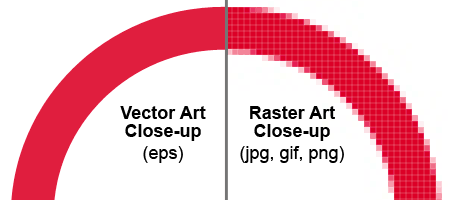
Vector files can be scaled to any size with no loss of quality because they're built from mathematically precise points. Raster files are made of small squares called pixels, so as you enlarge them they become blocky or blurry. That's why a design should be created in vector format for the best results.
Ready to get a quote?
Send us your idea, a rough sketch, sizes and colors. We will take it from there.